A massage or foot reflexology centre runs on a different rhythm from a hair salon. Services are sold by time (30, 60 or 90 minutes), every session needs both a therapist and a free bed, chair or room, and a large share of customers walk in without booking. On top of that, most centres pay therapists per session, sell stored-value cards and take cash, cards, DuitNow QR and e-wallets at the same counter.
This guide covers what to look for when you choose a system for a massage, reflexology or tui na (推拿) centre in Malaysia, and ends with a checklist you can use when you compare vendors.
Map your day before you compare systems
Write down how a normal busy evening works at your centre:
- How many beds, reflexology chairs and private rooms do you have, and which services need which?
- What share of customers book ahead, and what share walk in?
- How do you decide which therapist takes the next walk-in?
- How are therapists paid: a flat amount per session, a percentage, a basic salary, or a mix?
- How many regulars hold a package or stored-value card?
Your answers decide which features matter. A small reflexology shop with eight chairs and mostly walk-ins needs a fast counter. A spa-style centre with private rooms and online bookings needs a strong calendar.
Time-based services and durations
Massage menus are built around time. The same foot reflexology might be sold as 45, 60 or 90 minutes, each at a different price, and a full-body massage may be combined with a short foot session. Your system should let you:
- Set one service with several durations, each with its own price, so the menu stays tidy.
- Add cleanup or changeover time after a session, so the next booking doesn't start before the bed is ready.
- Book several services in one visit, one after the other, with the right therapist for each.
- Handle extensions (加钟) cleanly. If a customer adds 30 minutes, sell the extra time as its own line so it is priced and paid on correctly.
Rooms, beds and chairs
A free therapist isn't enough: there must also be a free place to do the treatment. Look for a system where a service can require a resource, such as a reflexology chair or a treatment room, and where a booking is refused when none is free at that time. Otherwise two bookings can end up sharing one room, and you only find out when the second customer arrives.

If you have different kinds of space (open-plan reflexology chairs versus private rooms for oil massage), check how the system tells them apart, and whether it shows the day by therapist so the counter can see at a glance who is free.
Therapist rotation (轮钟 / 排钟) and requested therapists
Many Malaysian centres share walk-ins between therapists by rotation (轮钟 or 排钟): the next walk-in goes to the therapist at the top of the list, who then moves to the bottom. When a customer asks for a particular therapist (点钟 or 指定), that therapist takes the session, and many centres pay a small bonus for it or charge the customer a request fee.
When you look at systems, ask two clear questions:
- Does it keep a rotation queue for me, or will the counter still keep the rotation on a board or in a notebook? Not every system automates this, so ask to see it working.
- Can it record that a session was requested, and pay the request bonus correctly in payroll?
Whatever the answers, write your rotation rules down (what happens when a therapist is on break, or when a requested session comes in) so the counter applies them the same way every day.
Walk-ins without slowing the counter
At 9 pm on a Friday, nobody wants to fill in a long form. Check that the counter can:
- Start a sale without a full customer profile when the customer doesn't want to register, and attach one when they do.
- Find returning customers quickly by phone number.
- Put a walk-in straight into the calendar, so the schedule shows that the therapist and the room are busy.
Packages and stored-value cards
Stored-value cards and multi-session packages are everywhere in Malaysian massage and reflexology: "top up RM 500, get RM 50 free" or "10 foot reflexology sessions for the price of 8". They help cash flow, but only if they are tracked properly. Look for:
- Session packages with an expiry date and a history of every session used.
- Stored value with bonus tiers, where the system keeps what the customer paid separate from the bonus. For example (made-up numbers), a RM 500 top-up with RM 50 bonus gives RM 550 to spend, but only RM 500 was actually received.
- Balances shown at checkout, so the counter doesn't have to dig out a card or a notebook.
- Top-ups treated as prepaid money, not sales. Revenue should count when the credit is used, otherwise your monthly sales figures jump around.
- Import of existing balances, if you are moving from paper or another system.
Our guide on packages and credit explains the common setups.
Commission per session
Therapists in Malaysia are often paid a fixed amount per session, sometimes with different amounts for different services or for senior therapists, plus extras for requested sessions and add-ons such as hot stones or herbal compresses. Your system should handle:
- Fixed amounts per service as well as percentages.
- Different rules by service, category or staff level.
- Sessions redeemed from packages, so therapists are paid for work done on prepaid cards.
- Splits when two therapists share a session, such as a four-hand massage.
We go through the maths, with worked examples, in how to calculate massage therapist commission.
Payments: cash, cards, DuitNow QR and e-wallets
On a normal day you might take cash, debit and credit cards, DuitNow QR, Touch 'n Go eWallet, GrabPay and bank transfers. A good POS should:
- Record every payment method by name, so the daily close shows how much came in through each method.
- Allow split payments, for example part stored value and part DuitNow QR.
- Handle cash properly: opening float, cash in and out, and a closing count that shows expected versus counted cash.
- Work with the card terminal you already have from your bank.
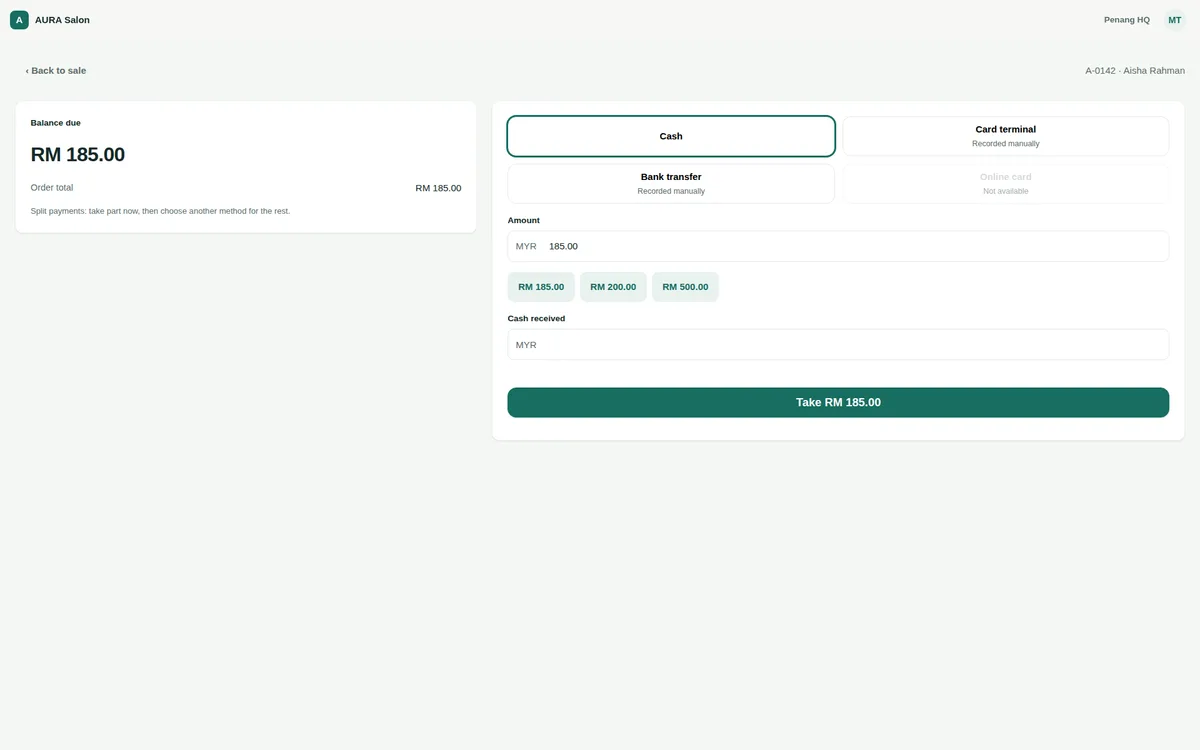
Many POS systems record QR and e-wallet payments rather than process them. The customer scans your shop's QR code and the cashier marks the payment. That's fine as long as each method shows up separately in reports, so your figures match your bank and e-wallet statements.
Tax and records
Whether your centre has to register for and charge service tax depends on the services you provide, your turnover and the current rules, which have changed several times in recent years. Your POS should let you set tax yourself and show it separately on receipts. Please check your situation with your accountant and the official Royal Malaysian Customs Department (JKDM) guidance before you set up tax in any system.
The checklist
- Services with several durations and prices, plus cleanup time.
- Services that require a chair, bed or room, with double-booking blocked.
- A day view by therapist that the counter can read at a glance.
- A clear answer on rotation (轮钟) and requested sessions (点钟).
- Fast walk-in sales, with customer lookup by phone.
- Session packages with expiry, and stored value with bonus tiers.
- Top-ups recorded as prepaid money, not sales; balance import from your old system.
- Commission as fixed amounts or percentages by service and staff level, including package sessions.
- Cash, card, DuitNow QR and e-wallets recorded by name; split payments; a daily cash close.
- Tax settings you control, and reports your accountant can use.
- Multi-branch reports if you run, or plan to run, more than one outlet.
Where Senvia POS fits
Senvia POS is a cloud POS and booking system made by HS Commerce Sdn Bhd in Malaysia, in English and 简体中文, for the browser, iPad and Android. For massage and reflexology centres:
- Services can have several durations (for example 30, 60 and 90 minutes), each with its own price, plus cleanup time, and a service can require a chair or a treatment room. A booking is refused when no matching resource is free.
- The calendar shows each therapist's day side by side, and a booking can go to a named therapist or to anyone who is free and able to do the service. Each customer profile can record a dedicated team member.
- Walk-in sales are allowed at the counter (you decide in the checkout rules whether a customer must be attached).
- Session packages with validity, freezing and transfer rules, and stored value with bonus top-up tiers. Top-ups are recorded as a liability, and revenue counts when the credit is used.
- Commission rules as a percentage or a fixed amount per item, by service, category, role or staff level, including package sessions, with splits between therapists at checkout. Automatic payroll is an add-on on the Base plan and included in Full.
- Payment by cash, your own card terminal, bank transfer, stored credit and your own named methods such as DuitNow QR or Touch 'n Go, with split payments and a daily cash close.
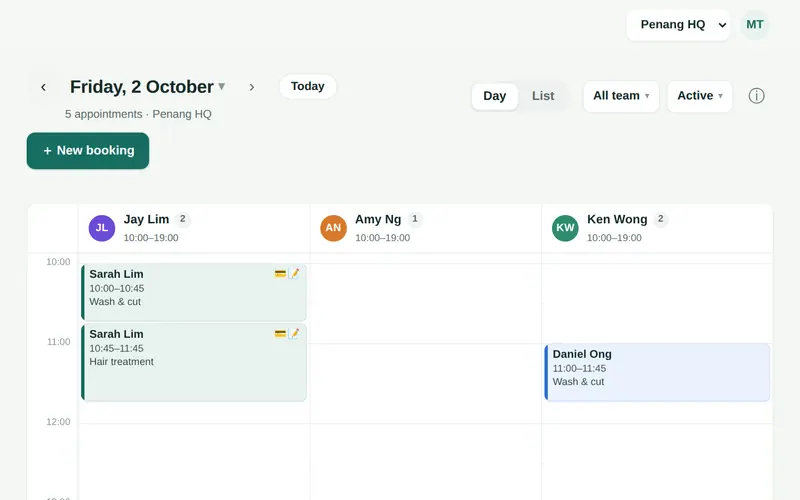
To be clear about what it doesn't do: at the time of writing Senvia POS doesn't keep an automatic rotation (轮钟) queue, so centres that rotate walk-ins keep their rotation list at the counter and use the calendar to see who is free.
At the time of writing, plans start at USD 25.90/month, with a 30-day free trial and no card needed. See pricing for current details, or read about moving from your current system.